Thrive Psychological Services
SMS Program & Opt-In Workflow
Last updated: August 25, 2026
Thrive Psychological Services is a California mental-health practice. We send text messages only to our own established patients, and only to those who have explicitly asked for them. This page documents every way we collect that consent, the disclosures shown at the moment of consent, and how a patient stops the messages.
We operate two domains, both ours: thrivepsychservices.org (this public site) and thrivelycare.com (our secure patient portal). Consent is collected on both: the primary opt-in is a checkbox on the public forms on this site, which anyone can open and inspect at thrivepsychservices.org/coverage.
Program at a Glance
- Brand
- Thrive Psychological Services
- Program
- Appointment reminders and scheduling updates
- Message types
- Appointment reminders, booking confirmations, cancellation and rescheduling notices, and secure telehealth join links — all tied to an appointment the patient booked with us.
- Message frequency
- Varies with the patient's own appointment schedule; typically 1–6 messages per month.
- Cost
- Message and data rates may apply.
- Opt out
- Reply STOP to any message, or turn texts off in the patient portal.
- Help
- Reply HELP, call 909-295-5805, or email support@thrivepsychservices.org.
- Not a condition of care
- Consent to receive text messages is never required to book, receive, or continue care, and is never bundled into any other agreement.
How Consent Is Collected
There are four ways a patient can opt in. Each records a timestamped consent, and none of them is a condition of receiving care. The first is a live, publicly browsable form on this website.
1. Web — a standalone checkbox on our public forms (primary method)
Our public coverage-check form, open to anyone at thrivepsychservices.org/coverage, asks the visitor for their own mobile number. Directly beneath it sits a separate, unchecked, entirely optional checkbox labelled “Text me appointment reminders and updates”. The same checkbox appears on our appointment-reservation form.
It is not required to submit either form, nothing on either form depends on the answer, and it is never pre-selected. The checkbox is labelled “Text me appointment reminders and updates (optional)”, and the disclosure printed directly beneath it reads, verbatim:
“From Thrive Psychological Services. Frequency varies; msg & data rates may apply. Reply STOP to opt out, HELP for help. Not required to receive care.” — followed by links to our Terms of Use and Privacy Policy.
Consent to email and phone follow-up about the visitor’s own care is a separate agreement, disclosed in text at each form’s submit button. Text-message consent is never bundled into it, into our Terms of Use, or into any other agreement — the SMS checkbox is the only checkbox on those forms.
2. Web — during patient account setup
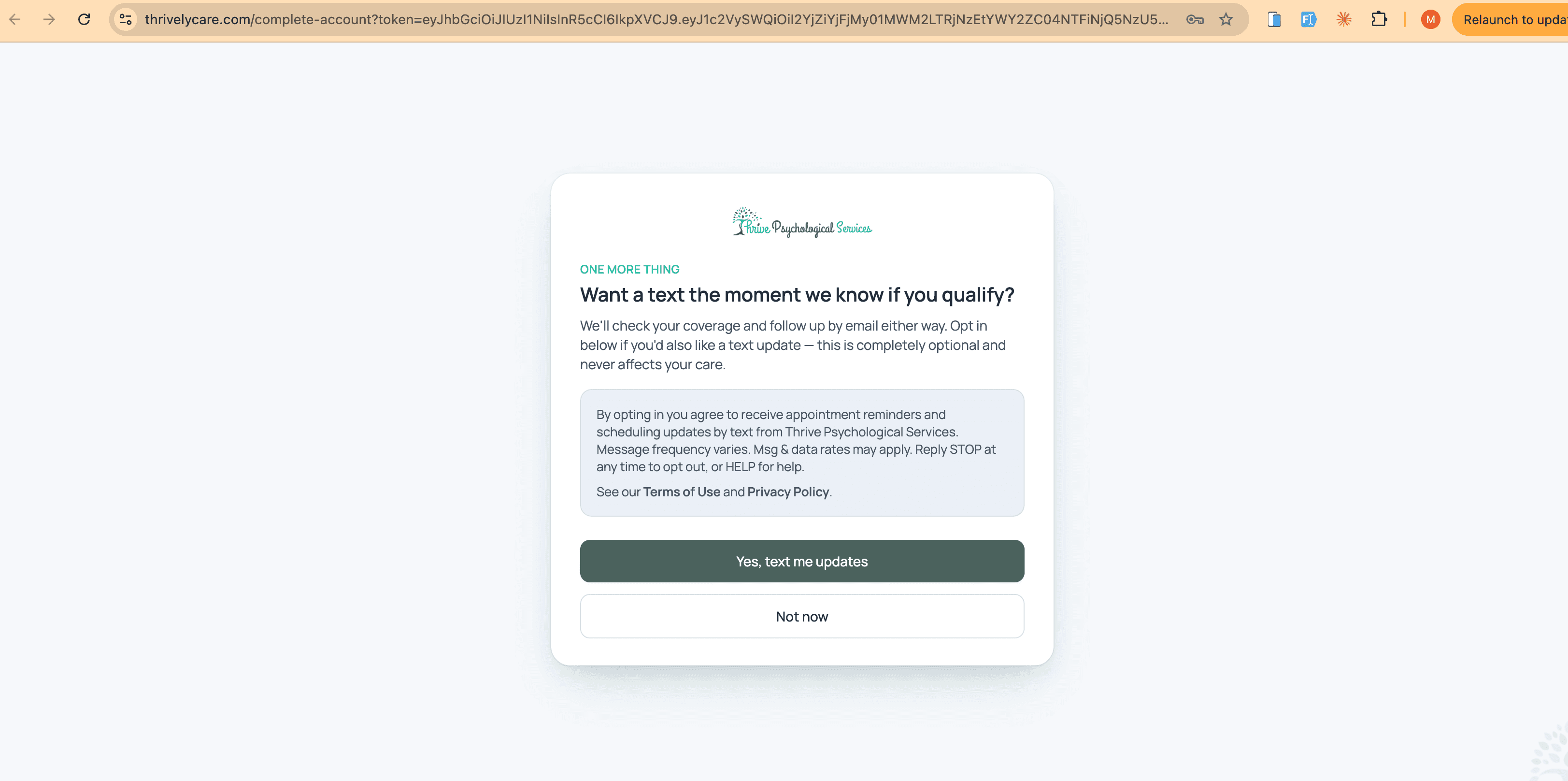
A patient who books an appointment or requests a coverage check on this website enters their own mobile number on that form. We then email them a private, single-use link to create their portal account on thrivelycare.com. After they set a password, they reach a standalone screen that asks — and only asks — about text messages. Nothing else on the page depends on the answer.
The screen states, verbatim:
“By opting in you agree to receive appointment reminders and scheduling updates by text from Thrive Psychological Services. Message frequency varies. Msg & data rates may apply. Reply STOP at any time to opt out, or HELP for help.” — followed by links to our Terms of Use and Privacy Policy.
The patient must tap “Yes, text me updates” to consent. “Not now” declines, and account setup and care continue unaffected. A patient who opts in immediately receives a confirmation text that repeats the frequency, rate, HELP, and STOP disclosures.
This screen is reached only through an individually issued single-use token, so it cannot be browsed publicly. The capture below is of the live screen, with the browser address bar visible:
3. Patient portal — self-service, any time
A logged-in patient can turn text messages on or off at any time from Account Access › Notifications in the portal. The same disclosure is shown inline next to the toggle:
“By opting in you agree to receive appointment reminders and scheduling updates by text from Thrive Psychological Services. Message frequency varies. Msg & data rates may apply. Reply STOP at any time to opt out, or HELP for help.” — followed by links to our Terms of Use and Privacy Policy.
4. Signed consent document
For patients who prefer paperwork, our staff can send a Text Message Consent document through the secure portal for the patient to read and e-sign. It carries the same disclosure, and the signed copy is retained in the patient’s record.
“By opting in you agree to receive appointment reminders and scheduling updates by text from Thrive Psychological Services. Message frequency varies. Msg & data rates may apply. Reply STOP at any time to opt out, or HELP for help.” — followed by links to our Terms of Use and Privacy Policy.
What We Do Not Do
- We send no marketing or promotional text messages of any kind.
- We never share or sell opt-in data or mobile numbers with third parties or affiliates for their own marketing.
- We never text purchased, rented, or imported lists — every recipient is an established patient who opted in themselves.
- We never bundle SMS consent into another agreement, and we never make it a condition of booking or receiving care. On our public forms the SMS opt-in is its own optional, unchecked checkbox, kept separate from the contact consent covering email and phone follow-up.
- We keep clinical detail out of text messages. Messages carry scheduling information only.
Sample Messages
Bracketed values are filled in per patient. These are the message templates we send:
- Thrive Psychological Services reminder: your appointment with [Provider Name] is [Date] at [Time]. Reply STOP to opt out.
- Thrive Psychological Services: your appointment with [Provider Name] is confirmed for [Date] at [Time]. Details in your portal: https://thrivelycare.com/patient-login. Reply STOP to opt out.
- Thrive Psychological Services: your virtual appointment with [Provider Name] on [Date] at [Time] will be on Zoom. Join here: https://thrivelycare.com/join/[Access Token] Reply STOP to opt out.
- Thrive Psychological Services: your appointment with [Provider Name] on [Date] at [Time] has been cancelled. Reschedule: https://thrivelycare.com/s/[Code] Reply STOP to opt out.
- Thrive Psychological Services: your appointment with [Provider Name] has been rescheduled to [Date] at [Time]. Details in your portal: https://thrivelycare.com/patient-login. Reply STOP to opt out.
Opting Out and Getting Help
Reply STOP to any message and we stop immediately — the patient receives one final confirmation and nothing after that. Replying START resubscribes. Replying HELP returns our contact details. A patient can also turn texts off in the portal, call us at 909-295-5805, or email support@thrivepsychservices.org. Opting out never affects a patient’s care, and email confirmations continue either way.
Policies
Our full Terms of Use include an SMS/Text Messaging Terms section, and our Privacy Policy describes how we handle mobile numbers, including that opt-in data is not shared with third parties for marketing.